Weather Radar Home
OmniHome AppsWeather
4.2706.00 Reviews
- Version
- 4.0.46
- Installs
- 500.00K
- Age Rating
- Everyone
Screenshots
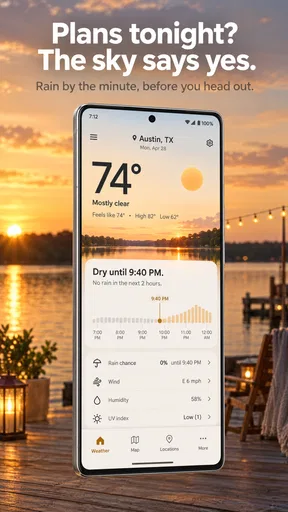
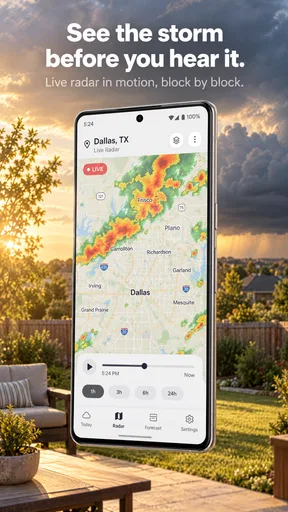
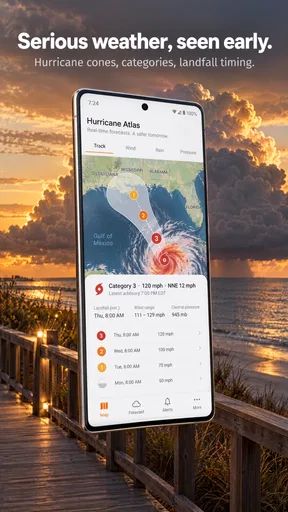
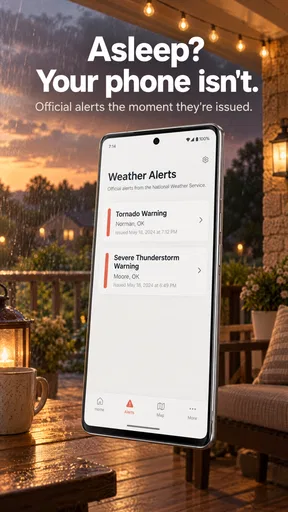
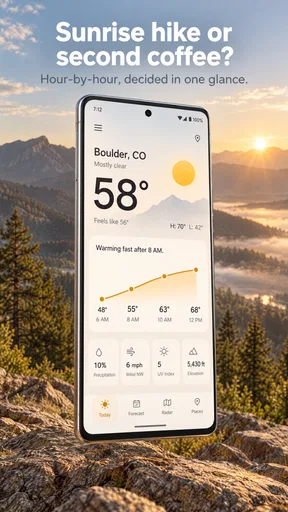
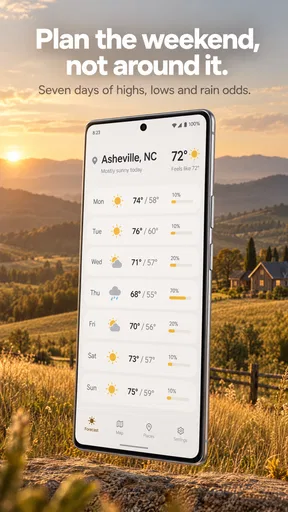
Our Review of Weather Radar Home
 Analysis by Appyee
Weather Radar Home is the kind of weather app I would install when I want useful storm information without opening a full forecast dashboard every time. Its main idea is simple: keep weather radar and alerts close to the place where I already begin many phone sessions, the home screen. After spending time with it, I found that this focus makes it more practical than a standard forecast app in some situations, although it also means it is not a complete replacement for a detailed meteorology service.
Developed by OmniHome Apps, this free weather app is aimed at everyday Android users who want quick access to changing conditions. It is rated for Everyone, works from Android 8.1 onward, and the current version is 4.0.36. The app has built a sizeable audience, with over 500 thousand installs, a 4.3 average from around 1.8 thousand ratings, and hundreds of written reviews. Those figures suggest that its home-screen approach is easy for many people to understand, but the real question is whether it fits the way you personally check the weather.
How the home-screen approach feels in daily use
The first thing I noticed is that Weather Radar Home is built around reducing the distance between me and weather information. Instead of treating the forecast as something I must remember to check, it places radar and current-weather awareness into the normal rhythm of using the phone. That is especially useful on unsettled days, when a forecast from the morning can become less helpful by lunchtime.
I found this most valuable before leaving home. A quick look at the home screen can answer the question I actually have: is the weather moving toward me, or is the rain likely to miss my route? That is a different need from reading a long forecast for the whole week. The app’s emphasis on radar makes it better suited to decisions involving the next few hours than to detailed planning several days ahead.
A realistic example is a school run or commute on a day with scattered showers. I can check the radar before putting on a coat, then look again before walking back later. A conventional weather app may provide the same general information, but it often requires opening the app, finding the radar layer, and interpreting a busy forecast screen. Weather Radar Home is more direct when the home-screen view gives me the information I need immediately.
That convenience does not mean every glance is perfectly clear. Radar is visual information, and it takes a little time to learn what the colors and movement mean in the app’s presentation. Someone who only wants a temperature and a simple rain percentage may find the radar emphasis unnecessary. I would not recommend choosing this app solely because it sounds more advanced; I would choose it because visual storm tracking is genuinely useful to you.
Who benefits most from the radar-first design
This app makes the most sense for people who live in areas where weather changes quickly, commuters who travel outdoors, parents coordinating activities, and anyone who wants to monitor storms without repeatedly searching through menus. It can also suit users who dislike opening a large weather application just to answer a small question.
I particularly liked the idea of using it as a quick decision tool rather than as a source of endless forecast reading. Before a bike ride, I would rather see whether a rain band is approaching than spend time comparing several forecast panels. The same applies to walking a dog, hanging laundry outside, or deciding whether an outdoor appointment needs a backup plan.
On the other hand, users who need specialized information for sailing, aviation, agriculture, or emergency planning should be cautious about treating a general consumer app as their only source. A radar view is helpful, but it does not automatically provide the depth or professional context those decisions may require. For ordinary household planning, it is much more appropriate.
What the latest version means for the experience
The current release, 4.0.36, shows that the app is at a relatively mature stage rather than being a brand-new experiment. I see that as a positive sign for the basic concept: the home-screen weather idea has had time to develop, and the app is now presented as an established tool rather than a rough first attempt.
Still, a version number by itself should not be mistaken for a promise that every part of the experience will feel perfect on every phone. Android home screens differ considerably between manufacturers, launchers, and screen sizes. A widget or home-screen element can look balanced on one device and feel crowded on another. I would spend a few minutes adjusting its placement and size instead of assuming the first arrangement is the best one.
The app’s evolution is most meaningful for existing users when it preserves the fast path to radar. A weather tool can add many screens and settings over time, but that is only progress if the central action remains easy. My test of the current experience is straightforward: can I understand the weather situation before I lose interest? For this type of app, speed and clarity matter more than a long list of secondary controls.
How it compares with ordinary weather apps
Most standard weather apps are organized around a forecast page. They commonly lead with the current temperature, hourly conditions, and a multi-day outlook, while radar is available as one section among many. Weather Radar Home reverses that priority. It is a better match for someone who thinks, “What is happening around me right now?” rather than, “What will the weather look like across the coming week?”
That difference is important when deciding whether to keep it alongside another weather app. I can imagine using a familiar forecast application for longer-range planning and this one for quick radar checks. There is no need to force one app to do every job. The trade-off is that maintaining two weather tools can feel excessive if your needs are limited to a daily temperature and a basic forecast.
Compared with a dedicated radar service, the appeal here is convenience. The home-screen focus may make routine checks less disruptive. The likely compromise is depth: a specialist radar product may be preferable when you need more detailed map controls, broader weather layers, or information designed for serious storm monitoring. I would therefore place this app between a simple forecast widget and a professional radar platform.
The strongest reason to use Weather Radar Home is not that it replaces every weather tool; it is that it makes short-term weather awareness easier to reach. That distinction helped me judge it fairly. It is a focused companion, not necessarily the only weather app a household will ever need.
Practical habits that make it more useful
One useful habit is to check the radar at two different moments instead of relying on one glance. I would look before leaving and again before the return journey, especially when the sky is changing quickly. This turns the app into a planning aid rather than a static snapshot. It is a small workflow, but it is more reliable than assuming the morning forecast will describe the whole day.
A second tip is to use the home-screen view for decisions and open the fuller weather experience only when the situation deserves more attention. If I see weather approaching while I am preparing to leave, I can decide whether to wait, change clothes, or alter my route. This prevents the common habit of opening a weather app, scrolling through several sections, and still not answering the immediate question.
A third trade-off concerns visual confidence. Radar can look authoritative because it is presented as a moving map, but I would still combine it with what I can see outside and with any alert information available to me. A narrow shower can be difficult to interpret from a small home-screen view, and local conditions can vary over a short distance. The best use is to combine the app’s quick signal with sensible judgment, not to treat every colored patch as an exact prediction.
For families, the app can also support a simple shared routine. One person can check conditions before an outdoor activity, while another checks again near departure. That is more useful than forwarding a generic forecast because the decision is tied to the actual weather movement. I would avoid turning this into a constant monitoring task, though; the value comes from timely checks, not from staring at the radar all day.
Where the experience still has limits
The home-screen concept inevitably creates tension between convenience and detail. A compact view is quick, but it cannot show everything that a large map or a full forecast page can show. If I want to investigate a complicated storm pattern, I may need a different app or a larger screen. Weather Radar Home is strongest when the answer can be understood quickly.
There is also a learning curve for people who are unfamiliar with radar. A traditional list showing “rain later” may feel more approachable at first. The app’s visual approach rewards users who are willing to learn how movement and intensity relate to their local area. I would not call that a serious flaw, but it is a real consideration for someone who wants the simplest possible weather experience.
Another limitation is that a home-screen tool depends on fitting comfortably into the rest of the phone interface. If your launcher is already crowded, adding another weather element may reduce the clean look of the home screen. I would skip it if you strongly prefer a minimalist layout and rarely need storm information. In that case, the built-in weather option may be enough.
I would also avoid relying on it alone for high-consequence decisions. Outdoor event organizers, travelers facing severe conditions, and people in regions prone to dangerous storms should consult official warnings and more specialized sources as appropriate. The app can help with awareness, but a convenient radar view should not become a substitute for authoritative emergency guidance.
What existing users should notice after updating
For someone already using an earlier release, the practical question is whether the current version keeps the app’s central promise intact. I would pay attention to three things during normal use: whether the home-screen information remains easy to read, whether radar checks still feel fast, and whether the app continues to support the way you already organize your weather routine.
The current version is particularly relevant to users who have experienced changes in Android launchers or moved to a different phone. A layout that worked well before may need repositioning after a device change. Rather than judging the app from the first appearance, I would try it in the place where I naturally look at my phone. If the radar is visible without competing with important shortcuts, the design is doing its job.
New users should give themselves enough time to decide whether the radar view is actually helping. A first impression based on a calm, clear day may be misleading because the app’s value becomes more obvious when conditions are unsettled. I would test it across ordinary weather changes, not just during a single installation session.
Questions I would consider before installing
If you are wondering whether it costs anything, the app is free, which makes trying the home-screen approach relatively low-risk. The more important cost is attention: you need to decide whether radar is something you will use often enough to justify another place on your home screen. Free does not automatically mean useful, so I would judge it by how often it helps with real decisions.
If compatibility is your concern, the app supports Android 8.1 and later. That covers a broad range of Android devices, but the visual result can still depend on the phone’s launcher and screen dimensions. I would expect the basic availability to be straightforward while allowing for some adjustment to the home-screen arrangement.
If you are asking whether it is suitable for children, its Everyone content rating makes it broadly appropriate from a content standpoint. However, I would still teach younger users that radar is an aid for understanding weather, not a guarantee that conditions will remain safe. That is good weather-app practice regardless of the interface.
If you want a complete long-range forecast, I would think carefully before making this your only choice. Its identity is centered on radar, alerts, and quick access from the home screen. A conventional forecast app may be better for comparing several days, planning travel, or reading detailed hourly information. The two approaches solve different problems.
If you are deciding whether the app has enough community confidence to try, its 4.3 average and substantial install base are encouraging signs, while the written feedback from around 451 reviews gives it more visibility than an obscure utility. I would still treat ratings as a starting point rather than a guarantee, because weather needs vary widely by location and personal routine.
My recommendation for different kinds of users
I would recommend Weather Radar Home to someone who regularly asks whether rain or storms are moving toward a particular place and wants that answer close at hand. It is especially appealing if opening a full weather app feels like too much effort for a quick check. The home-screen orientation gives it a clear purpose, and the current release suggests a product that has moved beyond its earliest stage.
I would recommend pairing it with another source for detailed planning rather than expecting it to cover every weather need. That is not a criticism of the app’s focus; it is the natural result of choosing radar and immediate awareness as the main experience. In my view, its usefulness increases when I give it a specific job instead of asking it to become a universal weather reference.
I would skip it if I only want a quiet, minimal temperature display, if I dislike visual radar maps, or if I need professional-grade weather analysis. Those users may be happier with a simpler built-in widget or a specialized service. Installing it just because it is free would probably lead to clutter rather than value.
For me, the app’s best quality is its practical timing. It encourages a weather check at the moment a decision matters: before walking out, before starting a trip, or before committing to an outdoor plan. The experience is less about collecting forecast details and more about noticing what is changing around me.
Overall, I see Weather Radar Home as a focused and approachable weather companion from OmniHome Apps. Its free price, Everyone rating, broad Android support, and established user base make it easy to try, while its radar-first design gives it a distinct role beside ordinary forecast apps. I would keep it installed when short-term storm awareness matters more to me than a crowded collection of forecast screens. Just remember its boundary: it is most convincing as a quick home-screen radar tool, not as the sole authority for complex or dangerous weather decisions.
Privacy and Permissions
See what permissions an app requests and how it handles your data.
- Contacts
- read your contacts
- Location
- approximate location (network-based), precise location (GPS and network-based)
- Phone
- directly call phone numbers
- Photos/Media/Files
- read the contents of your USB storage
- Storage
- read the contents of your USB storage
- Camera
- take pictures and videos
- Wi-Fi connection information
- view Wi-Fi connections
- Other
- view network connections, expand/collapse status bar, full network access, run at startup, set wallpaper, control vibration, prevent device from sleeping
Verdict
Strengths of Weather Radar Home
- Clear radar maps make approaching rain and storms easy to track.
- Useful forecasts help with planning commutes, trips, and outdoor activities.
- Location-based weather information is convenient for daily checking.
- Radar animations provide a quick view of changing weather conditions.
- Simple layout makes core weather information easy to find.
Limitations of Weather Radar Home
- Some advanced radar features may require a paid subscription.
- Forecast accuracy can vary between locations and weather conditions.
- Radar imagery may take time to load on slower connections.
- Frequent alerts could become distracting if not customized.
- The app may use extra battery when location and radar updates stay active.
Similar Picks in This Category
View All
Weather - By Xiaomi
Xiaomi Inc.4.1

Weather & Radar Forecast
WetterOnline4.8

Weather
OneLouder Apps4.6

AccuWeather: Weather Radar
AccuWeather3.6

The Weather Channel - Radar
The Weather Channel4.6

1Weather Forecasts & Radar
OneLouder Apps4.3
Frequently Asked Questions
What is Weather Radar Home and what can I use it for?
Weather Radar Home is a weather application designed to provide quick access to current conditions, forecasts, and radar-based weather information. During testing, it proved useful for checking rain activity, following approaching storms, and planning daily activities. Depending on your location and device settings, the app may also offer temperature, wind, precipitation, and severe-weather details.
Does Weather Radar Home provide live weather radar information?
The application is built around radar-style weather monitoring, allowing users to view precipitation and storm activity on an interactive map. Radar availability and update frequency can vary by region, data provider, internet connection, and subscription level. Users should remember that radar predictions are estimates, so official local alerts should always be consulted during dangerous weather.
Does Weather Radar Home require location access?
Weather Radar Home can generally be used by entering a city or location manually, but enabling location access makes the experience more convenient by automatically displaying weather conditions for your current area. You can usually manage this permission through Android or iOS settings. If privacy is important to you, deny location access and use manual searches instead.
Is Weather Radar Home free to download and use?
The app may be available to download at no initial cost, but some features can depend on advertising, in-app purchases, or a premium subscription. Before installing, review the store listing carefully for details about paid radar layers, ad removal, extended forecasts, or subscription renewals. Pricing and available features may differ between Android, iOS, and individual countries.
Can I rely on Weather Radar Home for severe-weather warnings?
Weather Radar Home can be helpful for monitoring developing rain or storms, but it should not be treated as the only source of emergency information. Forecast models and radar data can occasionally be delayed or inaccurate, particularly during rapidly changing conditions. For tornadoes, floods, hurricanes, or other serious threats, follow notifications from official weather agencies and local authorities.
